
.svg)
A SCORM authoring tool is software used to create training content and export it in SCORM format, so it can be uploaded into an existing learning management system such as Moodle, Cornerstone, SAP SuccessFactors, or TalentLMS. The choice affects both the speed of content production and the reliability of progress tracking within your LMS.
This guide explains what a SCORM authoring tool is, why the standard exists, the practical difference between SCORM 1.2 and SCORM 2004, the xAPI question, what to evaluate before purchasing, the most common mistakes to avoid, and how AI authoring changes the production process compared to traditional tools.
What is a SCORM authoring tool?
A SCORM authoring tool lets you build a course, lessons, quizzes, multimedia content, and package it as a SCORM file that any compatible LMS can import and track. This is different from building courses within the LMS itself, which often means working with rigid templates and limited design options.
SCORM, short for Shareable Content Object Reference Model, was developed to solve an interoperability problem: without a shared standard, a course built for one LMS couldn't be reliably imported and tracked in another.
An authoring tool that exports SCORM packages compliant with the standard protects this portability, regardless of the LMS the company uses today or might adopt in the future.

SCORM 1.2 vs SCORM 2004: what to know
SCORM 1.2 is the older, more widely supported version, compatible with almost every LMS on the market, including legacy systems. It tracks basic data such as completion status and quiz scores, but has more limited reporting capabilities on detailed learner interactions.
SCORM 2004 adds more granular tracking, including sequencing rules and more detailed interaction data, but not every LMS fully supports it, and some platforms implement it inconsistently.
In practice, most teams choose based on what their LMS supports. That's why an authoring tool should support both formats instead of forcing a choice.
xAPI vs SCORM: is it worth switching?
xAPI, also known as Tin Can API, is a more modern standard that tracks learning more granularly than SCORM, including activities outside a traditional LMS, such as reading an article, participating in a simulation, or observing a process in the field. For most companies, however, switching to xAPI isn't an immediate priority.
SCORM 1.2 and 2004 cover the tracking requirements of the vast majority of corporate training programs, and the ecosystem of SCORM-compatible LMS platforms is vastly larger. xAPI becomes relevant for much more complex learning scenarios, outside the traditional LMS.
It only makes sense to address the choice between the two standards after solving the upstream problem, namely the speed of content production.
What happens when your SCORM course doesn't work in your LMS
A practical problem many companies encounter after choosing an authoring tool is discovering that the exported SCORM package doesn't work as expected within their LMS.
The most common symptoms are completion not being tracked, quizzes that don't record the score, or courses that always show as "not completed" even after the user has finished all the lessons.
These issues almost always stem from one of two causes: incompatibility between the SCORM version exported by the authoring tool and the one supported by the LMS, or a non-standard implementation of the protocol by the LMS itself.
Before purchasing an authoring tool, it's worth asking the vendor for a test with a real course uploaded to your LMS, not just a generic demo on a test platform.
A second useful precaution is to check whether the tool lets you choose the SCORM version to export at export time, not only at course creation time. This lets you export the same course in multiple versions if you have different LMS platforms across the company, or if you're planning to change LMS during your subscription.

What to evaluate when choosing an authoring tool
Here, then, is what to evaluate in an authoring tool.
- Compatibility with your LMS: verify explicit support for both SCORM 1.2 and 2004, since compatibility varies, especially with platforms like Moodle, Cornerstone, SAP SuccessFactors, Docebo, or Adobe Learning Manager.
- Content creation speed: traditional authoring still requires manual, slide-by-slide work; an AI tool can generate a complete draft from an existing document in a few minutes.
- Translation support: look for contextual translation that preserves technical terms, not a layer of basic machine translation.
- Update workflow: check how easy it is to revise content when a source document changes, since traditional tools often require rebuilding slides manually.
- Quality of lesson structure: the tool should break content down into short, distinct lessons, not export a single long module repackaged as SCORM.
- Real-world testing before purchase: ask the vendor for a test with one of your own documents uploaded to your LMS, not just a demo on a generic test platform.
How to keep SCORM courses up to date over time
An often-underestimated aspect of choosing an authoring tool is the content update workflow.
Most company procedures and policies change at least once a year, between regulations being updated, processes being revised, and new tools entering the workflow. Every time content changes, the course needs to be updated and the new SCORM package needs to be reuploaded to the LMS.
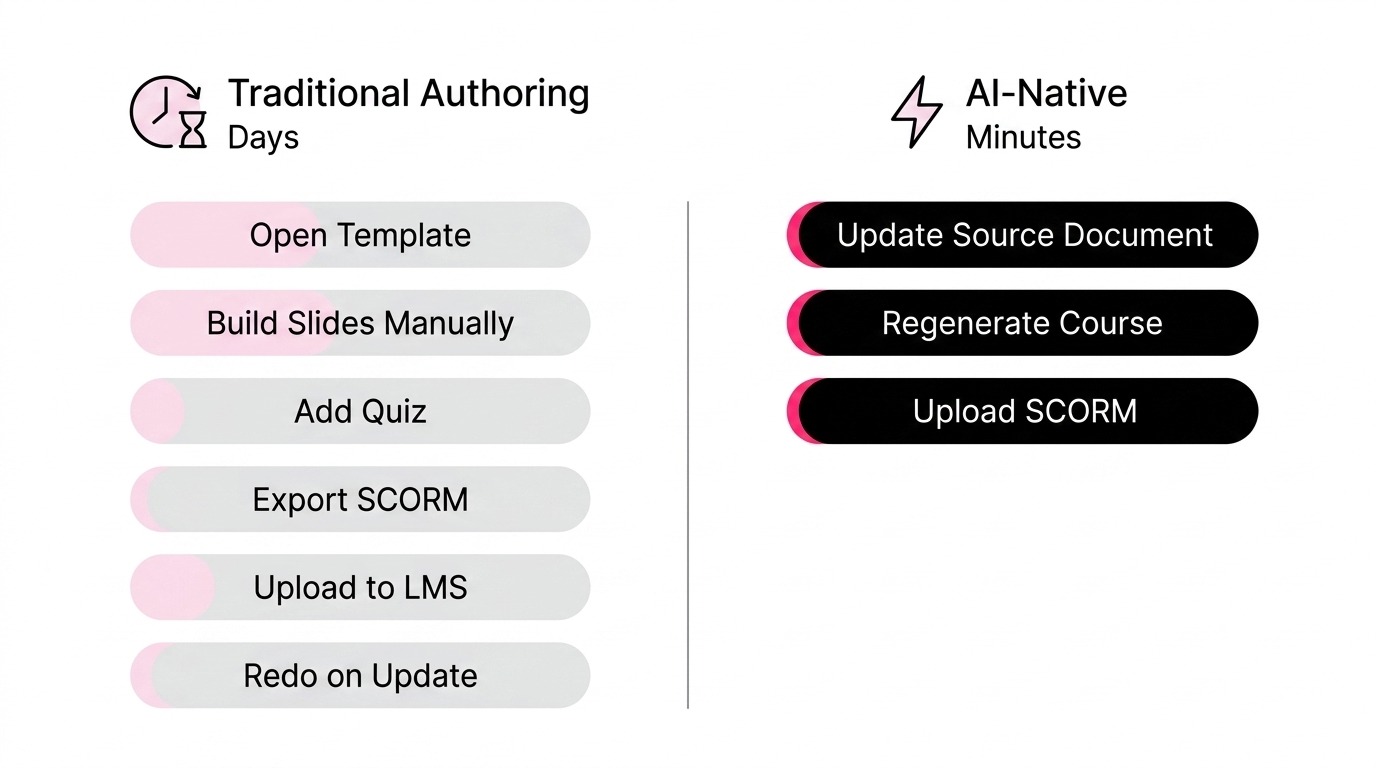
With a traditional authoring tool, this process requires reopening the original project, editing the slides, re-exporting the package, uploading it to the LMS, and managing versioning for users who had already completed the previous course.
With an AI-native system like Microlearning365, the workflow is much simpler: you update the source document, regenerate the course, and reupload the SCORM package. The time drops from days to minutes.
But artificial intelligence also affects other aspects.
The traditional authoring workflow starts from an empty template: an instructional designer builds the slides, adds quizzes, and exports the package, a process that can take days even for a single course. AI authoring reverses this logic: it starts from an existing document and automatically generates a structured course, including quizzes and supporting images.
Microlearning365 takes this approach and supports export to SCORM 1.2 and 2004, which means teams already running on Moodle, Cornerstone, SAP SuccessFactors, TalentLMS, or Docebo can keep their existing LMS while replacing only the content production process.
Common mistakes when choosing a SCORM authoring tool
The first mistake is assuming that SCORM 2004 support automatically means better tracking in practice, when in reality some LMS implementations handle it inconsistently.
The second is choosing a tool mainly for its template library, without checking real production times with an actual company document.
The third is overlooking translation quality: a literal translation can distort technical terminology in ways that matter for compliance content. The fourth is not checking the update workflow: a course that can't be updated quickly becomes outdated within a few months.

FAQ
Should I choose SCORM 1.2 or SCORM 2004?
It depends on what your LMS supports. SCORM 1.2 has broader compatibility, especially with older systems, while SCORM 2004 offers more detailed tracking but inconsistent support across platforms. A good authoring tool should let you export to both.
Why isn't my SCORM course tracking correctly in the LMS?
The most common problem is incompatibility between the exported SCORM version and the one supported by the LMS, or a non-standard implementation of the protocol by the platform. Ask the vendor for a test with one of your documents on your LMS before purchasing.
How long does it take to update a SCORM course when a procedure changes?
With a traditional authoring tool, anywhere from hours to days. With an AI-native system like Microlearning365, you update the source document and regenerate the course in a few minutes.
Is it worth switching from SCORM to xAPI?
For most companies, not right away. xAPI becomes relevant for much more complex learning scenarios, outside the traditional LMS. SCORM covers the requirements of the vast majority of corporate programs.
Which LMS platforms are commonly compatible with SCORM exports?
Moodle, Cornerstone, SAP SuccessFactors, TalentLMS, Docebo, Adobe Learning Manager, and Saba are among the most common. It's worth confirming compatibility for your LMS's specific version before purchasing.


Book a free demo
See how Microlearning365 turns your documents into professional courses in minutes.


.svg)